Overview
► Try the Live DemoThe Church Management Platform is a modular web application for managing church operations.
Included
- People & Families
- Groups & Small Groups
- Events & Calendar (month, week, day, agenda, rooms)
- Kiosk Check-In
- Giving & Donations
- Reports
- Forms
Optional Add-Ons
- Services & Worship Planning
- Communications (email & SMS broadcasts)
- Planning Center Integration
- Mailchimp Integration
Plus a companion Mobile App for iOS & Android.
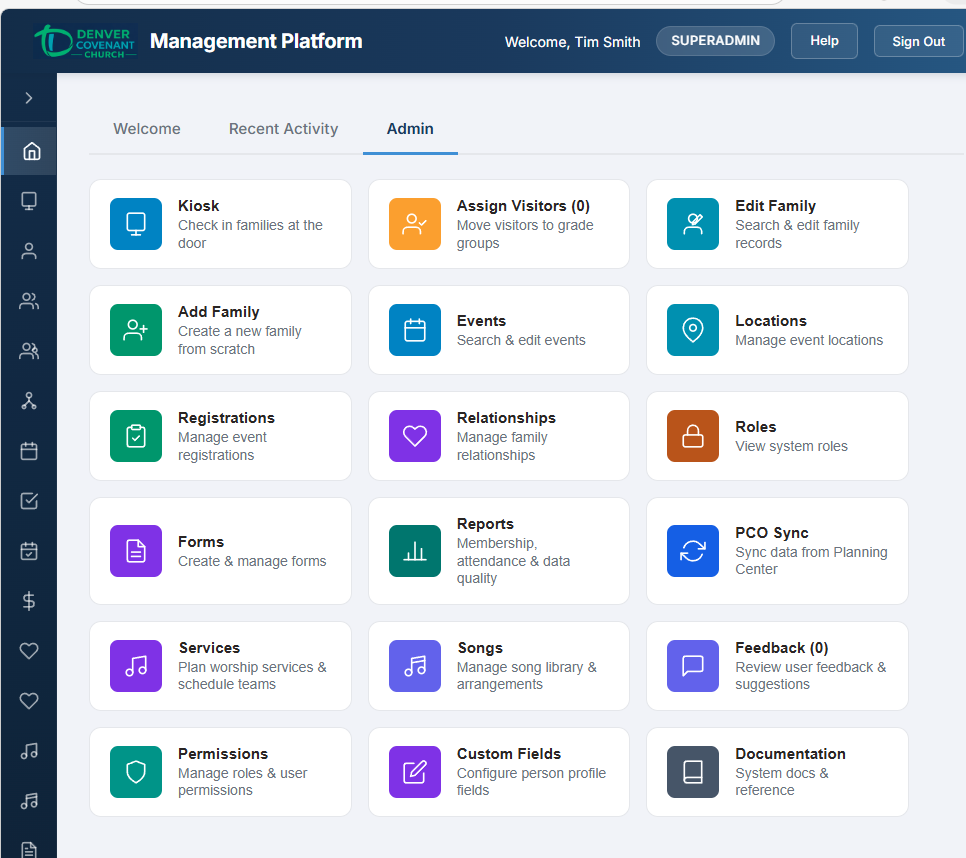
The Admin dashboard — every module accessible from a single view.
This page is the starting point for all platform documentation. Each module below links to its own detailed guide covering both user and admin functionality.
Try the Live Demo
Explore the platform right now with pre-configured demo accounts. No setup required — log in at church.ilheureux.dev with any account below.
Start with Member, then Staff, then Admin. Each walkthrough builds on the previous one — no repeated content. Member covers the basics (dashboard, events, giving, groups), Staff adds people management, services, and content creation, and Admin adds kiosk check-in, reports, communications, and room scheduling.
Demo accounts can create and edit data but cannot delete anything. Changes may be periodically reset.
Modular Architecture
Eight included features ship with every deployment, covering the functionality most churches need out of the box — including a visitor Connection Card that works via SMS or QR code. Five optional add-ons can be enabled as needed. A companion mobile app for iOS and Android rounds out the platform. Click on any tile below to learn more.
Included Features Click any tile to learn more
Connection Card
Visitors text CONNECT or scan a QR code to fill out a simple 4-field form. Phone auto-verified via SMS. Fuzzy email typo detection. Admin review queue.
IncludedPeople & Families
Member records, family management, contact info, photos, people search, admin verification, roles, and authentication. The foundation of the platform.
IncludedGroups & Small Groups
Department hierarchy, ministry groups, small group browsing with photos, join requests, leader messaging, and admin group management.
IncludedEvents & Calendar
Multi-view calendar (month, week, day, agenda, and rooms), room reservation with overlap prevention, recurring events, event descriptions, creation and editing, registration management, and location management.
IncludedKiosk Check-In
Lobby kiosk for family check-in by phone number, security code labels for child safety, parent pickup tickets, admin kiosk, and visitor assignment.
IncludedGiving & Donations
One-time and recurring donations via Stripe (card, ACH, Apple Pay, Google Pay), PayPal, Zelle, Venmo, and Cash App. Giving history, recurring subscription management, admin fund management, manual entry, and overview reports.
IncludedReports
Membership summaries, people and contact analytics, attendance trends with archival data, event registrations, and data quality dashboard.
IncludedForms
Admin-built registration forms linked to events, custom fields, role-based validation, and email invitations with event schedules.
IncludedAdd-On Features Enable as needed
Music Stand
Digital music stand for worship musicians — chord charts with real-time transposition, lyrics view, dark mode, fullscreen, adjustable font size, and keyboard navigation.
Add-OnServices / Worship Planning
Service types, song library with arrangements and chord charts, service plan builder, team scheduling, volunteer assignments, and blockout dates.
Add-OnPlanning Center Integration
Two-way sync with Planning Center Online—pull and push people, families, and groups. Real-time webhooks for instant updates.
Add-OnMailchimp Integration
Automatic email list management—sync members to Mailchimp audiences with merge fields, church group tags, and two-way unsubscribe tracking via webhooks.
Add-OnCommunications
In-app email and SMS broadcast composer with recipient filtering, preview, delivery tracking, and message history.
Add-OnCompanion App
Church Data Privacy
Your church's data belongs to your church. The platform is designed so that every deployment is completely isolated—your member records, contact information, and financial data live on your own dedicated server and are never shared with, visible to, or accessible by the platform developer or any other church.
People & Member Records
All personal information—names, phone numbers, email addresses, family relationships, group memberships, attendance history, and photos—is stored in your church's own private database on your own server. The platform developer does not have access to query, view, or export this data. Database-level security restrictions (not just application settings) enforce this boundary.
Financial & Giving Data
Donation records, giving history, fund allocations, and donor information receive the same isolation. The platform developer cannot view individual donations, giving totals, or any financial data associated with your members. Payment processing (Stripe and PayPal) connects directly to your church's own payment accounts.
How Isolation Works
- Dedicated server — each church runs on its own private server with its own database. No shared infrastructure with other churches.
- Database-level access control — the platform developer's credentials are restricted at the PostgreSQL database level to configuration tables only (feature toggles, module settings). Member data tables are explicitly blocked.
- No platform developer login — there is no web application account for the platform developer. The highest in-app role belongs to your church's designated administrator.
- Your credentials, your control — your church holds the database master password and the application connection credentials. The platform developer does not retain copies.
Roles & Permissions
The platform uses a granular permission system to control who can access what. Every user is assigned a role, and each role comes with a set of permissions that determine which features are available.
12 Built-In Roles
Roles range from full administrative access to basic member self-service:
SUPERADMIN
App owner — all permissions plus platform configuration (feature modules, integrations).
ADMIN
Full operational access — manage users, people, families, and all module features.
STAFF
Broad read access to people, families, events, and reports. Can edit people records.
Specialized Roles
EVENT_COORDINATOR, CHECKIN_ADMIN, GROUP_LEADER, WORSHIP_LEADER, FINANCE_MANAGER, FINANCE_VIEWER, TECH_ADMIN — each with permissions tailored to their area.
VOLUNTEER & MEMBER
Limited access for serving and self-service. MEMBER is the default role for new accounts.
48 Granular Permissions
Permissions follow a {resource}.{verb} pattern (e.g., events.manage,
giving.export). Verbs include view, create,
edit, delete, manage (superset), and
export. Permissions are organized by feature:
- People — people.view, people.edit, people.manage, people.export
- Families — families.view, families.create, families.edit, families.manage
- Church Groups — church_groups.view, church_groups.create, church_groups.delete, church_groups.manage
- Small Groups — small_groups.view, small_groups.delete, small_groups.manage
- Events — events.view, events.create, events.edit, events.delete, events.manage
- Registrations — registrations.delete
- Check-In — checkin.view, checkin.run, checkin.manage, checkin.delete
- Services — services.view, services.create, services.manage, services.delete
- Giving — giving.view, giving.view_all, giving.manage, giving.export, giving.delete
- Forms — forms.view, forms.create, forms.manage, forms.delete
- Reports — reports.view, reports.export
- Communications — communications.view, communications.manage, communications.delete
- Integrations — pco.manage, mailchimp.manage
- Admin — admin.users, admin.platform, admin.audit
Per-User Overrides
Administrators can grant or revoke individual permissions for specific users beyond their role
defaults. This is managed through the Permissions admin page at
/admin/permissions, which provides a role permissions matrix, per-user override
controls, and role assignment.
Backup & Reliability
Church data is protected by automated daily backups stored both on the server and in off-site cloud storage. If the server were lost entirely, your data can be restored from the most recent backup—typically less than 24 hours old.
What Gets Backed Up
- Full database — all member records, families, groups, events, check-ins, donations, and attendance history. Backed up daily and stored for 14 days.
- Photos — member and group photos synced daily to off-site cloud storage.
- Server configuration — application settings, web server configuration, and security certificates backed up weekly.
Recovery Guarantees
Full database
Automated, 2:00 AM
Cloud storage
Survives server loss
Restore test
Ensures backups work
- Recovery Point — in the worst case, no more than 24 hours of data is at risk (the time since the last daily backup).
- Recovery Time — a complete server rebuild from backup takes approximately 1–2 hours.
- Backup verification — every week, the latest backup is automatically restored to a temporary database and validated. This catches corrupted backups before they’re needed.
Uptime Monitoring
External monitoring checks the platform every 5 minutes. If the site goes down, administrators are notified immediately by email so the issue can be addressed before most users notice.
Scaling for Larger Churches
For churches that need higher availability and near-zero data loss, the platform supports database replication—a live standby copy of the database that stays seconds behind the primary. If the primary server fails, the standby can take over with minimal interruption. Managed database services with automatic failover are also available as an option.
Audit Trail
The platform maintains a comprehensive audit trail so you always know who changed what, when, and why. This is essential for accountability, regulatory compliance, and resolving questions about data changes.
What Gets Tracked
Two complementary layers work together to give you complete visibility:
Automatic Change Tracking
Every edit is recorded automatically — no extra work for staff.
- People, family, and contact edits
- Donation and recurring gift changes
- Event and check-in modifications
- Group membership updates
- Field-by-field old → new value diffs
Admin Action Log
High-impact admin actions are logged with context and intent.
- Role changes and permission overrides
- Feature module toggles
- Account verification and deactivation
- Password resets and account lockouts
- Manual donation entries
- Email and SMS broadcasts
Who Can See It
The audit log is available to platform administrators under Configuration → Audit Log. Two tabs let you switch between the detailed field-level change history and the high-level admin action log. Filters by date, entity type, action type, and user make it easy to find exactly what you’re looking for.
Church Branding & Customization
Every deployment is branded to your church. The platform automatically displays your church's logo, name, tagline, service times, and contact information throughout the interface — no code changes required.
What Can Be Customized
- Church logo — displayed in the header bar, login/registration pages, kiosk, and the mobile app
- Church name — appears in page titles, email communications, SMS messages, and throughout the interface
- Tagline — shown on the mobile app home screen hero banner
- Service times — displayed on the mobile app home screen and church info cards
- Contact information — address, phone, email, and website shown where applicable
- Giving methods — Zelle, Venmo, CashApp, and bank ACH details (empty values are automatically hidden)
Where Branding Appears
- Web interface — header bar (logo + name), login/register/password-reset pages, kiosk check-in header, and every browser tab title
- Mobile app — home screen header, hero banner with tagline, expandable church info card with address, service schedule, and website link
- Email — sender name, password reset subject/body, form invitation footer, join request notifications
- SMS — verification code messages include the church name
How We Compare
Side-by-side daily-use comparison: 8 real-world scenarios showing how a unified platform eliminates the app-switching, permission fragmentation, and reporting silos of Planning Center's multi-app architecture. Includes module mapping, pricing breakdown, and an honest look at what PCO does well.
LeadershipTechnical Documents Click any tile below to learn more
Cross-cutting technical references covering architecture, infrastructure, and data management.
Non-technical summary of the technology stack, API capabilities, security practices, data management strategy, and hosting infrastructure. For church leadership and decision-makers.
LeadershipHow church data is isolated per deployment — dedicated servers, database-level access controls, credential ownership, and what the platform developer can and cannot access.
LeadershipAutomated daily database backups, off-site cloud storage, backup verification, uptime monitoring, and disaster recovery procedures. Scaling options for larger deployments.
All AudiencesFull technical reference: clean architecture, database schema, REST API design, JWT authentication, React frontend, design system, deployment pipeline, and VPS infrastructure. For developers and DBAs.
TechnicalTwo-way sync architecture, API client design, inbound/outbound data flow, webhook handling, and PCO JSON:API models.
TechnicalTwo-tier storage model, JSONB offload design, archival script internals, EF Core integration, and proof-of-concept results with long-term projections.
Technical50,000+ record demo data generation plan for validating the archival system. Seven generation steps, record counts, and archival before/after comparison.
Technical